Zero-Shot vs Few-Shot Prompting: How LLMs Learn From Almost Nothing
Written by - Millan Kaul
What is Zero-Shot vs Few-Shot Learning?
Zero-shot and few-shot prompting enable LLMs to perform new tasks using instructions and examples without retraining.
WHY?
For Developers and SDETs
- Zero-shot lets you test LLMs on new tasks immediately using just instructions—no examples needed, perfect for quick prototyping.
- Few-shot gives you control by showing 1–5 examples in the prompt, teaching format/style without fine-tuning, ideal for consistent test outputs.
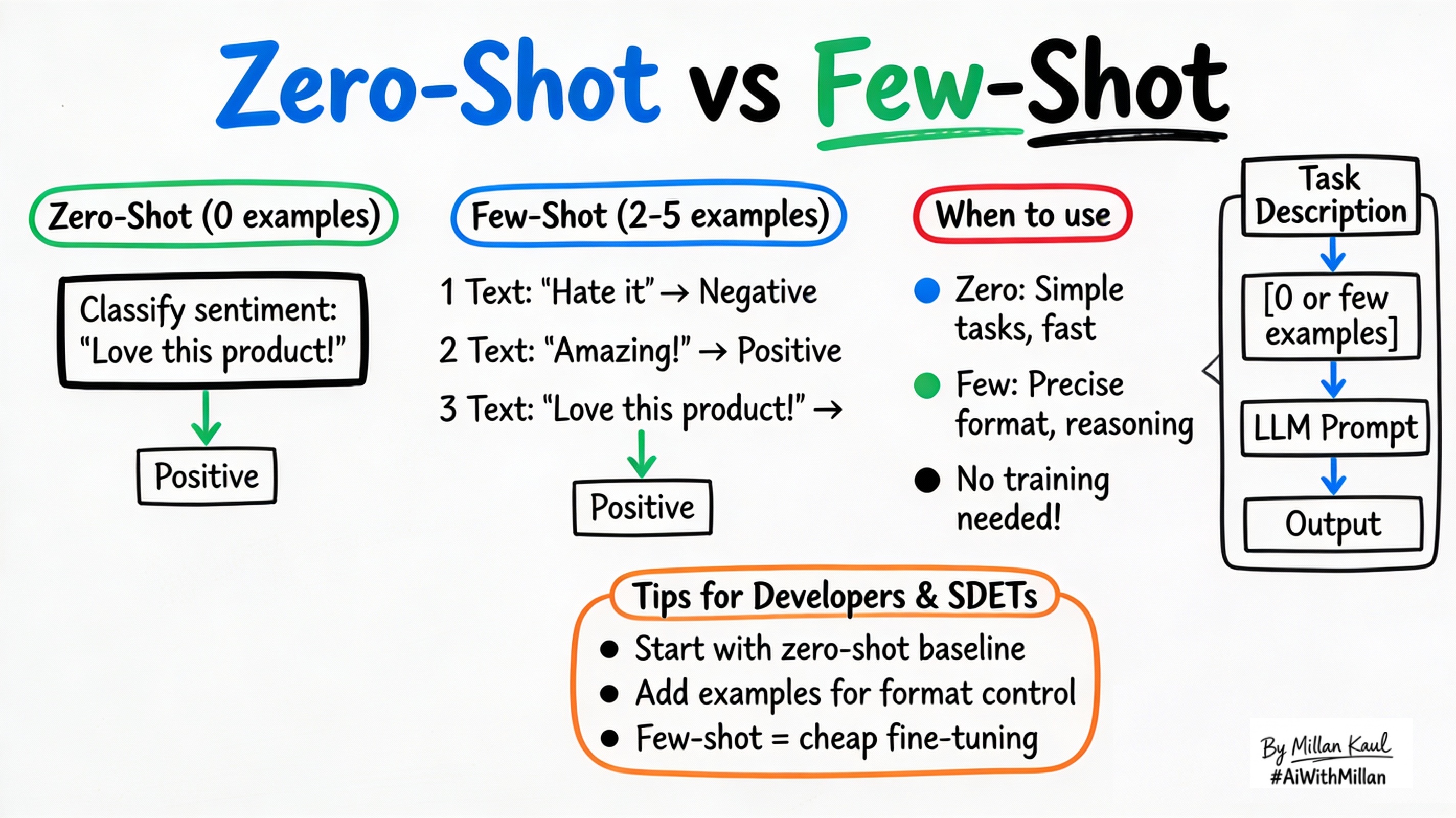
WHAT?
- Zero-shot learning: Give the LLM a task description with no examples; it uses pre-training to solve based on instructions alone.
- One-shot: Provide exactly 1 example (input + output) to demonstrate the pattern.
- Few-shot: Show 2–10 examples in the prompt to establish format, style, or reasoning steps (still no parameter updates).
Take these concrete examples:
- Zero-shot: “Classify sentiment: ‘Great product!’” → “Positive”
- One-shot: “Text: ‘Terrible service.’ Sentiment: Negative. Text: ‘Great product!’ Sentiment:” → “Positive”
- Few-shot: 3 sentiment examples → new text → model follows the exact format.
WHEN AND WHERE?
Use zero-shot when
- Task is simple/direct (classify, translate, basic extraction) and model has relevant pre-training.
- You want fastest iteration without crafting examples.
Use few-shot when
- Need precise format (JSON, table, step-by-step) or complex reasoning.
- Zero-shot gives wrong style, verbosity, or misses nuances.
Skip both when
- Need 90%+ precision or domain adaptation (fine-tune instead).
Think about where zero/few-shot fit in your workflow.
- Prompt playgrounds: test ideas instantly without datasets.
- Production pipelines: few-shot for structured outputs (test results → JSON report).
Concrete examples:
- Zero-shot test generation: “Generate 5 edge cases for login API.”
- Few-shot bug classification: 3 examples → “Classify this ticket: [description]” → “Priority: High, Type: Security”.
- Zero-shot summarization: “Summarize this log in 3 bullets.”
A few more detailed ones:
| Prompt Type | Example Prompt | Expected Output | Notes |
|---|---|---|---|
| Zero-Shot (0 examples) | Classify sentiment: Positive, Negative, or Neutral. Review: “The app crashes constantly and support ignores my emails.” Sentiment: | Negative | Simple tasks, fastest iteration |
| One-Shot (1 example) | Classify sentiment. Output only: Positive, Negative, or Neutral. Example: “Love the new features, super fast!” → Positive. Review: “The app crashes constantly…” Sentiment: | Negative | Shows exact format |
| Few-Shot (3 examples) | Classify sentiment. 3 examples shown → new review → output only sentiment.Ex1: “Love features” → PositiveEx2: “Crashes every time” → NegativeEx3: “Works okay” → NeutralReview: “App crashes constantly…” | Negative | Controls format, reasoning, edge cases |
HOW?
1. Conceptual steps
- Zero-shot prompt
- Clear instructions + input: “Translate to French: Hello world.”
- One-shot
- Instructions + 1 example + input: “… Example: English: dog → French: chien. English: cat →”
- Few-shot
- Instructions + 3–5 examples + input (chain them naturally).
- Iterate
- Test outputs, tweak wording/examples for better results.
2. Examples
- Zero-shot translation
- Prompt: “Translate to Spanish: The quick brown fox.” → “El rápido zorro marrón.”
- Few-shot JSON extraction
- 3 examples of “text → {name, age, city}” → new text → structured JSON.
- Few-shot reasoning
- 3 step-by-step examples → “Analyze business risk of this feature.”
3. Testing mindset
- Zero-shot baseline: measure raw capability.
- Few-shot uplift: does adding examples improve accuracy/format?
- Track prompt token cost as examples grow.
Pro Tips
| Scenario | Zero-Shot | Few-Shot |
|---|---|---|
| Best for | Simple classification, extraction | Precise format (JSON), complex reasoning |
| Example count | 0 examples | 2–5 examples max |
| Token cost | Lowest | Higher (watch context limits) |
| Leadership view | “Trust instructions” | “Smart intern with examples” |
| When to upgrade | Inconsistent outputs | Still poor → fine-tuning |
Test progression: Zero-shot → Few-shot → Fine-tuning
Works on: GPT, Claude, Gemini, Llama
For Leaders
- Zero/few-shot leverage pre-training investment for rapid task adaptation, saving weeks of data collection and training.
- They enable fast experimentation across teams, letting you validate AI ideas before committing to expensive fine-tuning.
- Early validation or low-stakes features where 80% accuracy suffices.
- Scaling to production where consistency > raw capability.
- In rapid prototyping—validate business value before investing in custom models.
- Few-shot is like giving a smart intern 3 examples to copy—zero-shot is trusting them to figure it out from description alone.
- “Trust instructions” vs “Smart intern with examples”.
Reference
- Glossary zero-shot prompting Google
- Zero-Shot vs. Few-Shot Prompting: Comparison and Examples shelf.io
- Microsoft Learn – “Zero-shot and few-shot learning” learn.microsoft.com
- GeeksforGeeks – “Zero-Shot vs One-Shot vs Few-Shot” geeksforgeeks.org
- Prompting Guide – “Zero-Shot Prompting” promptingguide.ai