LLM Fine-tuning: Customize Powerful Models for Your Needs
Written by - Millan Kaul
What is Fine-Tuning in LLMs?
Fine-tuning adapts pre-trained LLMs to specific tasks using smaller labeled datasets for better performance.
WHY?
For Developers and SDETs
- Fine-tuning takes a general pre-trained LLM and adapts it to your domain (code generation, test summarization, bug classification) using much smaller datasets than pre-training.
- It’s how you make LLMs follow your exact format, style, or rules (JSON output, safety policies, company tone) without changing the core model.
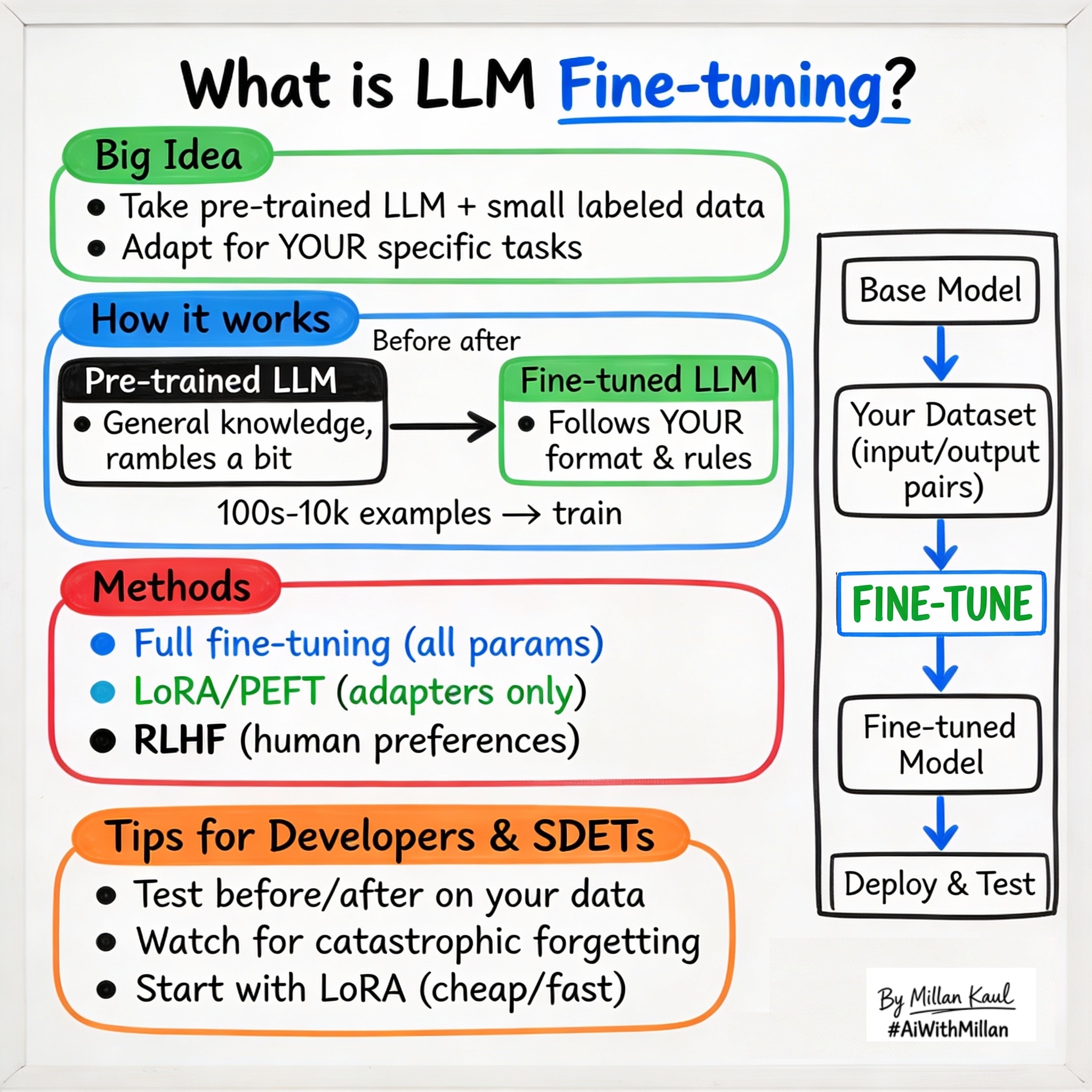
WHAT?
- Fine-tuning is taking a pre-trained LLM and continuing training on a smaller, task-specific dataset with labeled examples to improve performance on that task.
- Unlike pre-training (unlabeled, general knowledge), fine-tuning uses supervised data (input + desired output) to nudge the model toward your needs.
- Common types: Supervised Fine-Tuning (SFT) for instruction following, RLHF for human preferences, PEFT/LoRA for efficient updates without full retraining.
Take these concrete examples:
- SFT: Train on 1,000 examples of “bug log → JSON summary” to make the model output structured RCA.
- LoRA: Update only 0.1% of parameters for domain adaptation, keeping 99.9% frozen.
- Before/after: Base model rambles; fine-tuned model gives crisp “Pass/Fail + reason” for test results.
WHEN AND WHERE?
When fine-tuning is essential
- When zero/few-shot prompting gives inconsistent or verbose outputs—you need reliable format/style control.
- When building production features like “auto-classify bugs” or “generate test cases from stories” that need high precision.
When you can skip or delay fine-tuning
- For prototyping/exploration: prompting + examples often suffices for early validation.
Think about where fine-tuning fits in your workflow.
- After pre-training: always builds on a strong base model (GPT, Llama, Mistral).
- Before deployment: production LLMs are almost always fine-tuned for consistency and safety.
Concrete examples:
- Test automation: fine-tune on your repo’s test files so it generates Playwright/Pytest code in your style.
- Bug triage: fine-tune on past tickets to classify “critical/security/performance/UI” with 95% accuracy.
- Support bot: fine-tune on conversation logs to escalate properly and avoid off-topic responses.
HOW?
1. Conceptual steps
- Select base model
- Pick pre-trained LLM matching your needs (context length, speed, cost).
- Prepare dataset
- Collect 100s–10,000s of input/output pairs (prompt → ideal response). Clean, dedupe, balance.
- Choose fine-tuning method
- Full fine-tuning: update all parameters (expensive, accurate).
- PEFT/LoRA: update adapters (cheap, good enough).
- Train and evaluate
- Run on GPUs (hours/days), monitor loss, test on held-out data.
- Deploy and monitor
- Quantize, A/B test vs base model, watch drift.
2. Examples
- JSON output enforcement
- Dataset: 500 “log snippet → JSON RCA”. Fine-tuned model always outputs
{ "root_cause": "...", "fix": "..." }.
- Dataset: 500 “log snippet → JSON RCA”. Fine-tuned model always outputs
- Domain adaptation
- Fine-tune on sanitized internal docs so model understands company acronyms and workflows.
- Safety alignment
- Fine-tune with “refuse harmful requests” examples to reduce policy violations from 20% → 2%.
3. Testing mindset
- Compare before/after: zero-shot vs fine-tuned on your eval set (format adherence, accuracy).
- Catastrophic forgetting check: does fine-tuning break general capabilities?
- Watch for overfitting (great on train data, poor on new data).
For Leaders
- Fine-tuning is far cheaper and faster than pre-training, letting you customize powerful models for business needs without rebuilding from scratch.
- It bridges general capabilities (from pre-training) to specific performance requirements, reducing hallucinations and improving reliability for production.
- Fine-tuning refines pre-trained “generalists” into “specialists” for tasks like customer support, code review, or compliance checking.
- When general LLMs underperform on your domain data (legal docs, medical notes, internal jargon) but you don’t want full retraining costs.
- If RAG (retrieval) or advanced prompting solves 80% of needs, save fine-tuning for the last 20%.
- In model lifecycle management—fine-tune once, then use inference optimizations (quantization) for scale.
Reference
- DataCamp – “Fine-Tuning LLMs: A Guide With Examples” datacamp.com
- Google ML Crash Course – “LLMs: Fine-tuning” developers.google.com
- SuperAnnotate – “LLM fine-tuning in 2025” superannotate.com
- GeeksforGeeks – “Fine Tuning Large Language Model” geeksforgeeks.org