What is Tokenization? How LLMs See Your Text
Written by - Millan Kaul
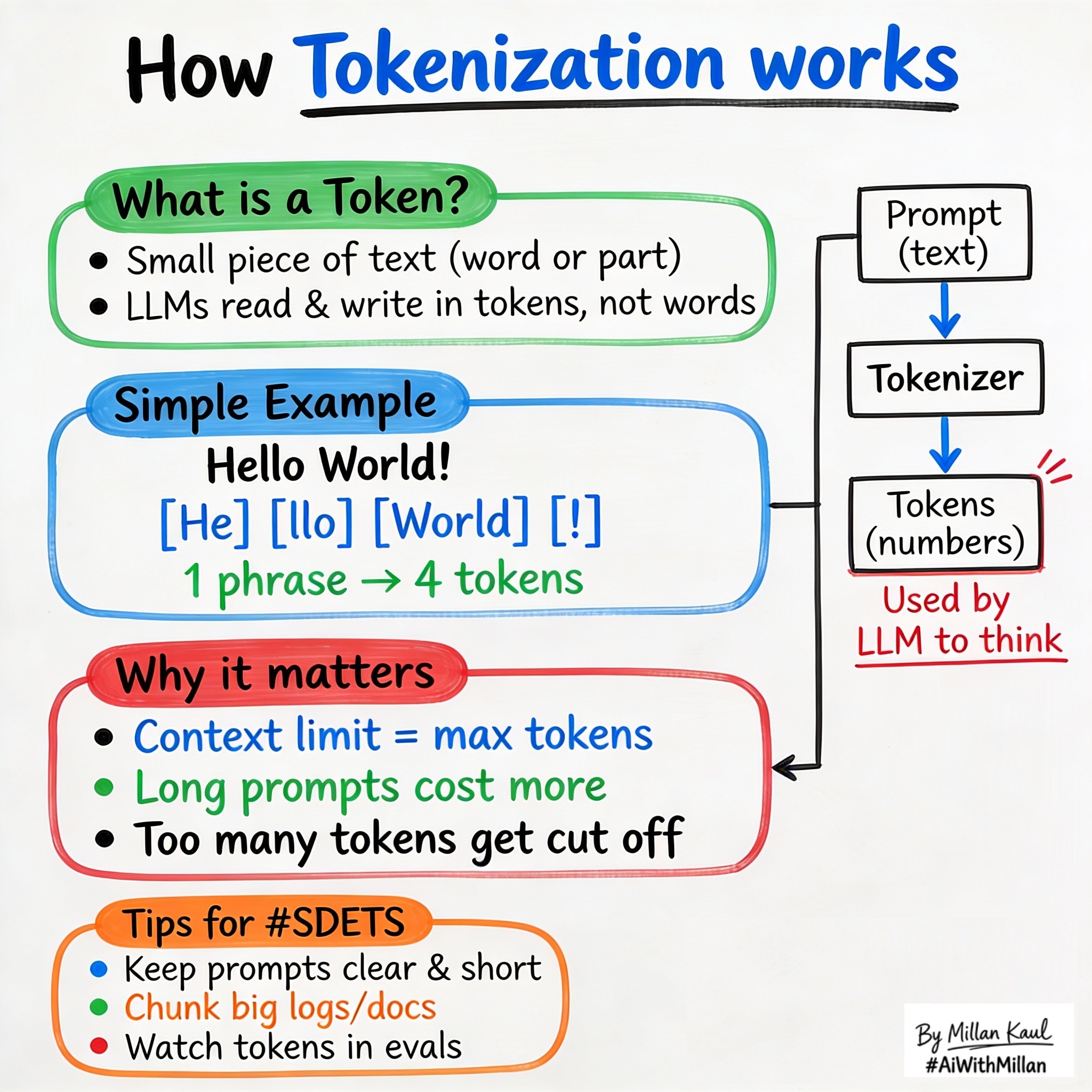
Tokenization: why “Hello World” becomes 4 tokens, how it affects your prompts, costs, and why context windows matter for testing.
WHY?
-
Billing and cost: LLM requests are charged by tokens, not words. “Hello World” is ~4 tokens, not 2. Understanding this helps you write prompts that fit the budget and avoid surprises on your AI bill.
-
Context windows: Every model has a max token limit (GPT-4 has 128K, Claude has 200K). Your prompt + response must fit within it, or the model silently chops off the start of your data—a silent killer for test reliability.
WHAT?
- Tokenization is the process of splitting text into small chunks called tokens—which can be letters, words, punctuation, or pieces of words. The model processes your prompt token-by-token, so token count directly affects speed, memory, and cost.
- Most LLMs use subword tokenization (like Byte Pair Encoding): common words = 1 token, but rare words, long IDs, and code often split into 2+ tokens.
- A context window is the total number of tokens the model can handle in one request (your prompt + the model’s response). Once you hit the limit, the model can’t add tokens; it either fails or quietly truncates the beginning of your input.
Examples:
Here are some real-world text samples with their approximate token counts:
- Wayne Gretzky’s quote “You miss 100% of the shots you don’t take” = 11 tokens
- The OpenAI Charter = 476 tokens
Note: Above examples are refered from OpenAI’s token article on What are tokens and how to count them?
Quick rule of thumb: 1 token ≈ 3-4 characters of English text. So a 1000-word document is roughly 200-300 tokens.
WHEN AND WHERE?
When tokenization matters most
- Writing AI test suites: When you craft a prompt that includes system instructions + examples + context, the total often exceeds your budget. Example: A guardrail prompt with a long policy list + user query can hit token limits before the model responds.
- Passing structured data: JSON, error logs, or code snippets tokenize inefficiently. A 50-line stack trace can eat 200+ tokens. Understanding this helps you trim or restructure data before sending it.
- Comparing models: A 4K-context model vs. a 128K-context model changes what you can do. Knowing your typical prompt size helps you pick the right model upfront.
Practical example scenarios
- A log-triage tool that suddenly fails: new log format makes each entry longer, pushing prompts past the context limit and truncating traces.
- A test harness that works with GPT-3.5 but fails with GPT-4 (different tokenizer, same prompt now exceeds limits).
- An AI assistant where prompts slowly grow (more policies, more context added over time), and you don’t notice token usage doubling until the bill arrives.
HOW?
Practical steps
- Estimate your prompt size
- Measure tokens for the key prompts you’ll reuse (system message, examples, typical input). Use a token counter (OpenAI’s or Hugging Face) or apply the 3-4 characters per token rule.
- Choose a model with enough headroom
- If your typical prompt is 2K tokens and you want room for a long response, pick a model with at least 8K context (leaving buffer). Don’t rely on exactly fitting the limit.
- Trim and restructure data
- Instead of dumping a full error log, send the last 20 lines. Convert JSON pretty-print to compact format. Summarize long policies into bullet points. Small reductions add up.
- Monitor tokens in your test suite
- Log token usage per request (most LLM SDKs report this). Over time, you’ll spot if prompt bloat is happening or if a new prompt format is expensive.
Real examples
- Test harness bloat: You have a system prompt (500 tokens) + test instructions (300 tokens) + 3 examples (1800 tokens total). Trimming examples to 2 and shortening instructions saves 600 tokens, making the suite faster and cheaper.
- Structured data explosion: Sending a full error traceback (multi-line) costs more tokens than sending just the exception message + final stack frame. You get nearly the same debugging info for 1/3 the tokens.
- Silent truncation: Your test prompts work fine with a 32K model, but when you upgrade to a specific 4K model by accident, tests start failing silently. Monitoring token count catches this immediately.
For Leaders
Why tokens matter: Token efficiency directly drives both cost and latency. A team that ignores tokenization can see monthly AI spending double silently as prompts grow (policies added, context expanded, examples accumulated). Early adoption of token budgeting prevents surprises.
Where to watch: Tokenization affects model selection (do we need 128K or is 8K enough?), infrastructure costs (per-request charges scale with tokens), and release timelines (bloated prompts slow down inference). Token metrics belong in your AI KPIs dashboard alongside precision and recall.
Risk management: Silent truncation is a classic failure mode: long prompts get chopped at the model’s limit, and you never see a warning. This can cause wrong answers, missed context in logs, or failed guardrails. Pre-mortems should include “what if our prompts hit the context limit?”
References
- “How to work with large language models” openai
- “What are Large Language Models?” nvidia
- “What is LLM? – Large Language Models Explained” aws
- “Large language model” en.wikipedia