Open Banking MCP: Compare Bank Rates in Your AI Assistant
Written by - Millan Kaul

Ask your AI to compare bank rates. No websites. No logins. Just real data.
Open Banking MCP is a Model Context Protocol server that brings Australian banking data directly into Claude, Cursor, and other AI assistants. Compare home loans, savings rates, credit cards—all through natural conversation.
Powered by Australian Consumer Data Right (CDR) Banking APIs public APIs. Real data from 120+ banks.
Why You Need This
Banking decisions shouldn’t require 10 browser tabs and manual comparisons.
You: “Compare mortgage rates between NAB, ANZ, and CBA” AI: [Fetches real-time rates, returns sorted comparison]
You: “Show me zero-fee credit cards” AI: [Searches all 120+ banks instantly]
You: “Which bank has the best savings rate?” AI: [Returns top 10 with exact rates]
No custom integrations. No API keys. Just ask.
What You Can Ask
- “How many credit cards does CBA offer?”
- “List all banks”
- “Compare mortgage rates between NAB, ANZ, and ING”
- “Show me the fees for TYRO product ID abc123”
- “Which bank has the lowest variable mortgage rate?”
- “Are there any zero-fee credit cards at WESTPAC?”
- “Find the best term deposit rates”
- “Show me personal loan rates for $20k”
Install & Configure
For Claude Desktop
- Install the MCP:
npm install open-banking-mcp - Add to Claude config:
- macOS:
~/Library/Application Support/Claude/claude_desktop_config.json - Windows:
%APPDATA%\Claude\claude_desktop_config.json
- macOS:
{
  "mcpServers": {
    "open-banking-mcp": {
      "command": "npx",
      "args": ["-y", "open-banking-mcp@latest"]
    }
  }
}
- Restart Claude. Done.
For Cursor
Cursor Settings → MCP → New MCP Server
{
  "command": "npx",
  "args": ["-y", "open-banking-mcp@latest"]
}
For VS Code
{
  "mcpServers": {
    "open-banking-mcp": {
      "command": "npx",
      "args": ["-y", "open-banking-mcp@latest"]
    }
  }
}
Or CLI:
code --add-mcp '{"name":"open-banking-mcp","command":"npx","args":["-y","open-banking-mcp"]}'
For Antigravity
Add to ~/.gemini/antigravity/mcp_config.json:
{
  "mcpServers": {
    "open-banking-mcp": {
      "command": "npx",
      "args": ["-y", "open-banking-mcp@latest"]
    }
  }
}
What It Does
| Tool | What It Does |
|---|---|
list_banks |
Find any of 100+ CDR-registered Australian banks |
list_banking_products |
Browse products from a specific bank |
get_banking_product |
Get full details: fees, rates, eligibility |
compare_bank_rates |
Side-by-side rate comparison (2-3 banks) |
compare_home_loans |
Find lowest home loan rates across all banks |
find_best_savings_rate |
Highest savings account rate (top 10) |
find_best_term_deposit_rate |
Highest term deposit rate (top 10) |
find_credit_cards |
Filter by travel, cashback, zero-fee |
find_personal_loans |
Lowest personal loan rates ($5k–$50k) |
How It Works
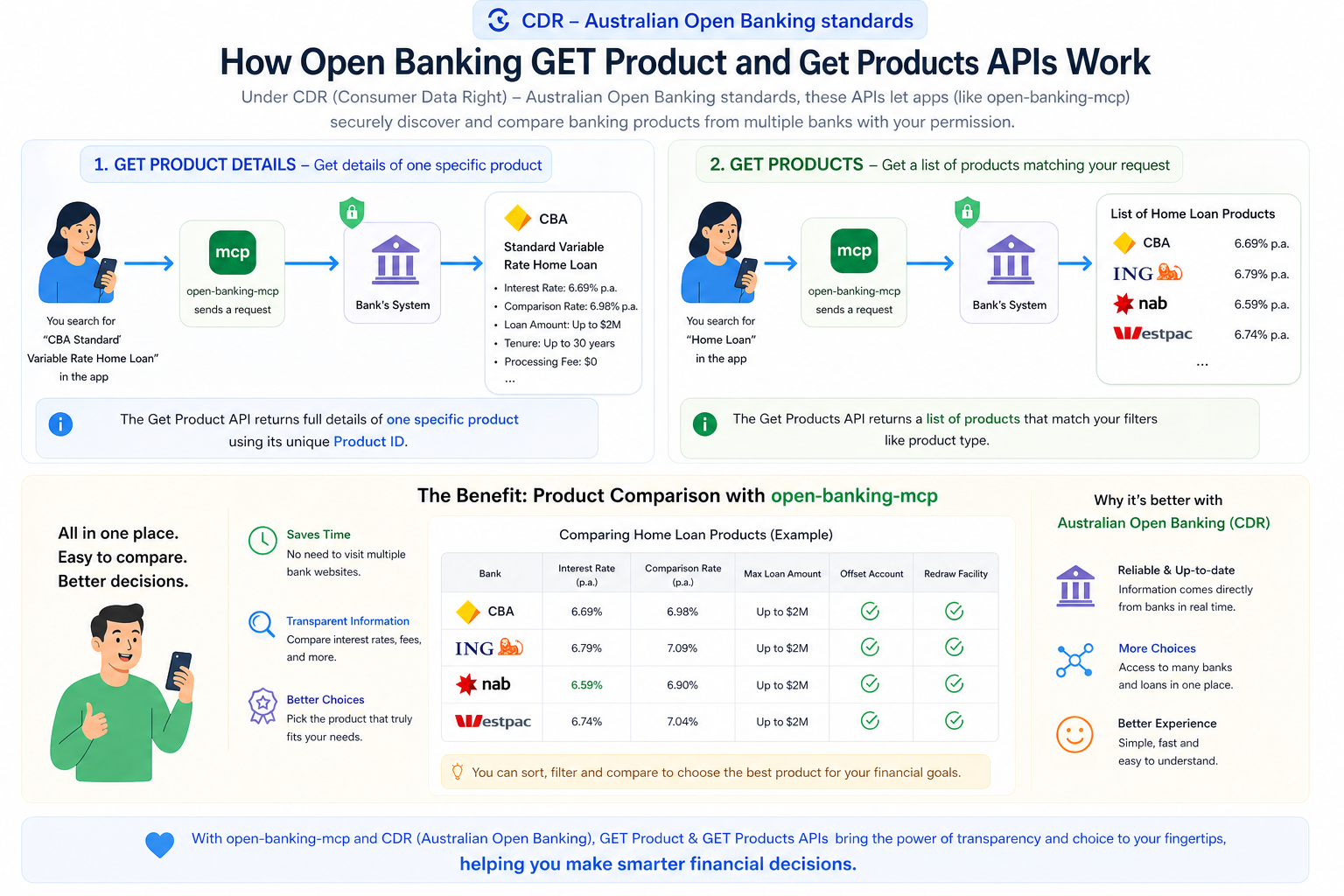
- You ask your AI a question about banking
- MCP server receives the request
- Fetches live data from banks’ public CDR APIs
- Returns formatted results instantly
- AI presents it naturally to you
Local Development
npm install
npm run build
npm test
npm start:http
Server runs on http://localhost:3001/mcp
Health check:
curl http://localhost:3001/health
Docker
docker build -t open-banking-mcp:local .
docker run -p 3001:3001 open-banking-mcp:local
HTTP / API Mode
Run as a server:
npx open-banking-mcp --http --port 3001
Endpoints:
| Endpoint | Purpose |
|---|---|
GET /health |
Health check |
POST /mcp |
MCP requests (SSE) |
GET / |
Server info |
Example: Compare rates
curl -X POST http://localhost:3001/mcp \
  -H "Content-Type: application/json" \
  -d '{
    "jsonrpc": "2.0",
    "id": 1,
    "method": "tools/call",
    "params": {
      "name": "compare_home_loans",
      "arguments": {"rateType": "VARIABLE"}
    }
  }'
Data Source
All data is publicly available through Australian CDR (Consumer Data Right):
⚠️ Disclaimer: This tool is not affiliated with any bank. Data changes frequently. Always verify with your bank before making decisions.