How MCP Works?
“MCP handshake → tool call → your code runs. 3 minutes to understand.”
MCP Flow (Database Agent Example)
- LLM: “User balance for ID=123?”
- Host: Discover tools → get_balance()
- Client → Server: tools/call({“user_id”: “123”})
- YOUR CODE: DB query → “$1,247.89”
- LLM: “Balance is $1,247.89”
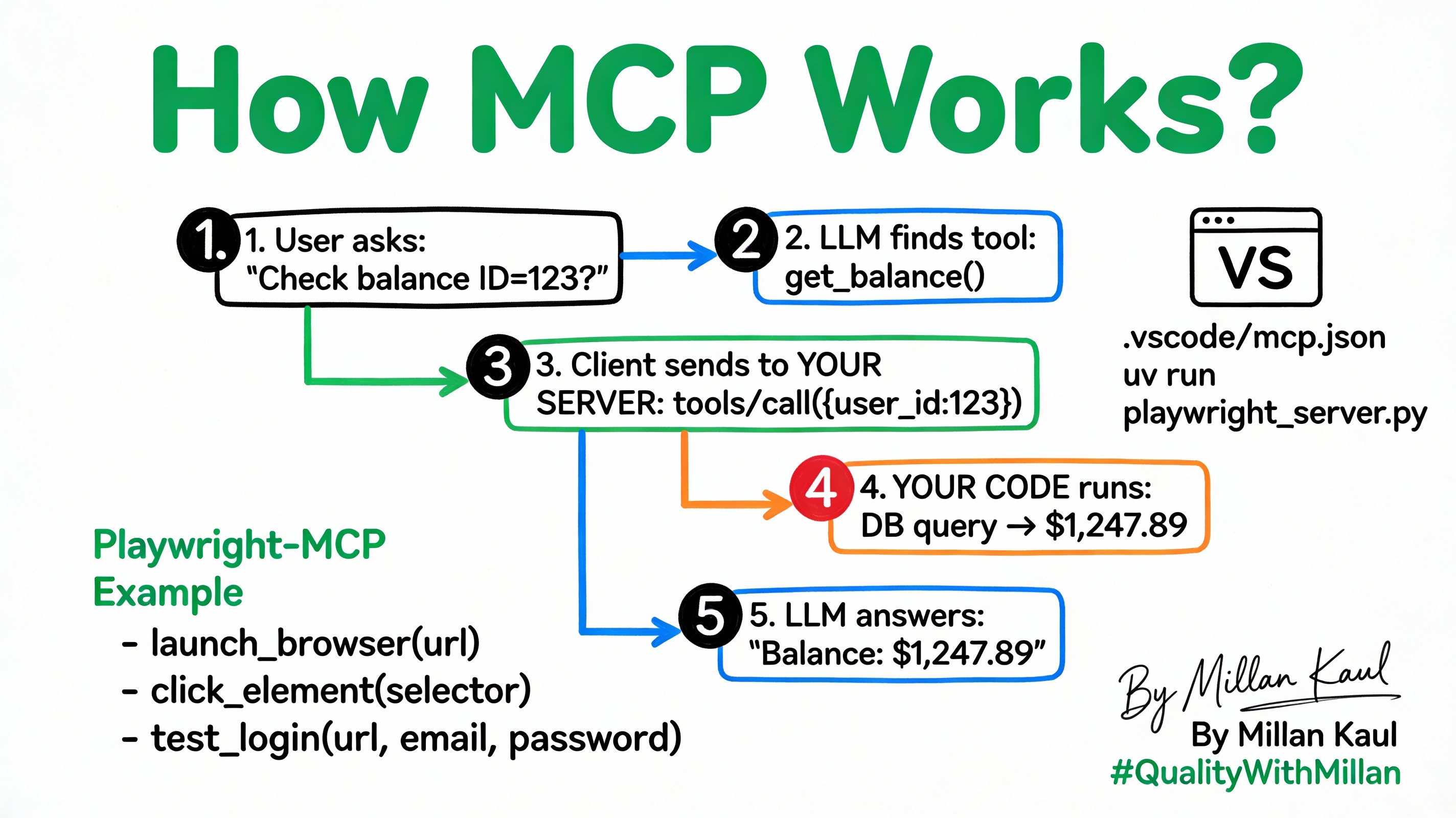
Playwright‑MCP Example (Browser Automation)
# playwright-mcp server
@mcp.tool()
def launch_browser(url: str) -> str:
    """Launch browser, navigate"""
    page.goto(url)
    return page.title()

@mcp.tool()
def click_element(selector: str) -> str:
    """Click visible element"""
    page.click(selector)
    return "Clicked"
Coding Assistant MCP Example
Dev: “Test login flow”
→ MCP calls:
- launch_browser(“https://app.com/login”)
- fill_form(“#email”, “test@example.com”)
- click_element(“#login-btn”)
- screenshot(“login-test.png”)
Tool Calling Details
Discovery (tools/list):
{
  "tools": [{
    "name": "launch_browser",
    "inputSchema": {
      "properties": {"url": {"type": "string"}},
      "required": ["url"]
    }
  }]
}
Call (tools/list):
{
  "name": "launch_browser",
  "arguments": {"url": "https://example.com"}
}
VS Code / Cursor Setup
.vscode/mcp.json (.cursor/mcp.json):
{
  "servers": [{
    "name": "Playwright MCP",
    "command": "uv",
    "args": ["run", "playwright_server.py"]
  }]
}
Usage: Chat → “Test login on example.com” → Auto‑calls Playwright tools.
Full Playwright‑MCP Server
from fastmcp import FastMCP
from playwright.async_api import async_playwright

mcp = FastMCP("playwright-server")

@mcp.tool()
async def test_login(url: str, email: str, password: str) -> str:
    async with async_playwright() as p:
        browser = await p.chromium.launch()
        page = await browser.new_page()
        await page.goto(url)
        await page.fill("#email", email)
        await page.fill("#password", password)
        await page.click("#login")
        title = page.title()
        await browser.close()
        return f"Login test: {title}"
Leadership view:
Every tool call = your code. Full audit, zero hallucinations.
Call‑to‑Action
“Build your first MCP tool today and deploy it by tomorrow.”